Last summer, I went to northern New York, to work on a construction project on a family property and blog about genealogy and family history when I could. Here is an anecdote that relates to antique furniture and a visit from an Amish family.
We are demolishing an old structure. There are lots of items to give away, as well as a smaller number of special things we want to keep for the new cabin that will be built on the site.
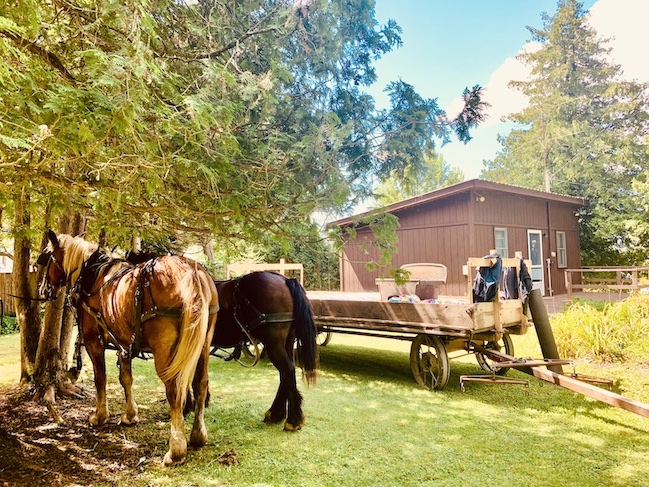
We have already given a wood-burning stove made of iron and several beds to a local Amish family, whose two middle sons, aged 18 and 19, loaded it up on the biggest horse-drawn wagon I have ever seen:
I was about to give away a chest of drawers to them. It's a piece of so-called "brown furniture" that is well made but not very popular nowadays.
“Don’t give it away," my parents said. "It’s a nice piece of walnut furniture with dovetail joints.”
I looked on the outside of the chest and couldn’t see any dovetail joints.
My father took out one of the drawers and showed me. I couldn't believe how small and fragile they looked, but they had held together this chest of drawers since sometime in the 1800s!
“The smaller the dovetail, the older the piece,” my father said. They are indeed tiny, a testament to the skill of the artisan who made it.
We are keeping the chest. But I also took a lesson to heart: Important details are easily missed. Sometimes, you need to look twice.
The lady in the photo above is my great-great grandmother, or "Granny Wallace," as my great aunt used to call her.
We didn't know much about Granny Wallace. She was born in the 1830s or 1840s. She moved around, living in 3 or 4 countries over the course of her life. She married twice.
I recently made an unusual major brick wall breakthrough, thanks to FamilySearch's database of free genealogy records. I typed in my great-great grandmother's maiden name in the basic records search. There were only three results, but one of them was pure genealogy gold!
It was Granny Wallace's 1891 marriage record from what is now Niagara Falls in Ontario. It showed her second marriage, and confirmed a story that my great aunt had told me decades ago - that after Granny Wallace's first husband died, she married the brother. Indeed, the marriage record showed that she married the younger brother. She was 50 at the time, and her new groom, himself a widower, was 41.
Crucially, the record confirms the birthplaces of the newlyweds. It also contains the names of both sets of parents, which I had not known. It further lists their religions - she was Baptist, he Presbyterian. It's enough information for me to dig further back in time on both lines over the winter.
It was an unusual find because I have searched FamilySearch hundreds of times for my great-great grandmother. She never turned up under her maiden name. But one of the wonderful aspects of FamilySearch is the regular addition of new records from all over the world. The 1891 Canadian marriage record must have been added in the last year or two.
The lesson for family historians: For genealogy brick walls, the passage of time can loosen the mortar. Re-check online databases and family trees to see if any new information has turned up since the last time you looked!
I am in northern New York this week. I took the scenic route through Vermont, because I wanted to stop at an ancestral graveyard on the far side of Lake Champlain to pay my respects ... and see if there are any other details I may have missed since my last visit 15 years ago.
The graveyard, located on Irish Settlement Road near the intersection with Military Turnpike (which has an interesting history) is small, but well kept. It contains mostly 19th-century graves of Irish settlers who came this area starting in the 1820s after an economic crisis struck the local weaving industry in County Meath, Ireland.
A 4x great grandfather is buried here, along with two of his sons, daughters-in-law, and many descendants. He died in 1837. The gravestone gives his place of origin - "A native of Philpotstown, Meath." In the past I have looked up this townland, and found two possibilities:
Rataine Civil Parish, Barony of Lower Navan, Co. Meath. South of Navan, containing part of the town of Dunderry. It is small and has a small population (blue arrow on the map below).
Ardsallagh Civil Parish, Barony of Lower Navan, Co. Meath. Larger area and population to the southeast of Navan, and very close to Hill of Tara, which is located a mile or two to the east (red arrow).
On this visit, I did a walk around the entire graveyard and noticed a stone belonging to another family which lists another nearby placename: Athboy. See it on the map below? It's on the left side, maybe 10 miles from the red arrow.
This piece of information verifies that immigrants buried in the Irish Settlement graveyard hailed from the same area. Does it mean that the Philpotstown marked by the red arrow is the correct place of origin, because it's closer to Athboy? Maybe.
Or maybe not. The economic crisis affected an entire region, so even though people settled in the same area in New York, it doesn't mean they were next-door neighbors back in Ireland. More research is needed. I hope to visit Ireland some day to do it in person, on the ground, seeing all of these places with my own two eyes.
There was another piece of information on my ancestor's gravestone, at the very bottom, right above the dirt:
"Also, Barnard his son died Feb"
So the son died a few months before the father. It makes you wonder if the two deaths were connected in some way. The stones do not say.
I paid my respects to my 4x Great Grandfather, touched the stones of other ancestors and relatives, and continued on my journey.
Earlier this year, I took our son on a scout camping trip in Plymouth, Massachusetts. Plymouth was made famous by the Pilgrims, who arrived in 1620 to escape religious persecution and create a new life for themselves and their children.
But if you were to visit Plymouth today, you would be surprised about how empty the area is. Driving through Myles Standish State Forest to the campground, we were struck by the wilderness around us. Miles and miles of scrubby forest and sandy soil, with most of the plant life consisting of short pitch pines and bushes, as shown in the picture above.
Indeed, Plymouth and nearby areas of Southeastern Massachusetts must have been a shock to the Pilgrims. Not only were the winters colder and the summers hotter than in England, the soil was terrible for planting. Quoting the Soil Science Society of America blog post titled "What type of farming challenges did the Pilgrims face?":
In the coastal area of Plymouth Colony, soils are shallow, sandy and stony. This contrasts with the farmlands of southern England, with deep, nutrient-rich loamy soil. In addition, the English soils were more fertile and tillable by hand or with draft animals to a depth of perhaps 6-12 inches. Massachusetts coastal soils were not deep, and sit on top of hard bedrock. The Pilgrims did not bring draft animals (horses or oxen) and although the sandy soils could be tilled or cultivated by hand, they were very stony, making this difficult work.
Sandy soils do not hold the nutrients – or water – that plants need for a bountiful harvest. They are more susceptible to drought, because the water filters through faster. The Pilgrims were lucky that the Wampanoag shared more suitable crops with them, such as corn and squash. These crops are able to grow in less ideal conditions. It’s reported that a late-season rain helped boost the harvest as well.
During that brutal first winter of 1620-1621, nearly half of the 102 Mayflower passengers died, and the colony came close to failing, as described in Nathaniel Philbrick's Mayflower: Voyage, Community, War.
The Pilgrims were determined, but it was not enough, especially as members began to die around them and it became clear that raising crops in the New World required a different approach. If you have Pilgrim ancestors, they survived only because the Wampanoag (specifically, the Pokanoket people) showed them how to farm. One of the many gifts the Native Americans gave to the Pilgrims were crops, such as corn, that were better suited to their new farming location, as well as the "Three Sisters" technique for strengthening soil nutrients and avoiding famine, as described in the SSSA blog.
Walking around the desolate Plymouth backcountry, I spotted two other things the Wampanoag introduced to the English settlers: wild turkeys and cranberries! Cranberries are now one of the few crops to truly thrive in southeastern Massachusetts, and you can see the bogs everywhere.
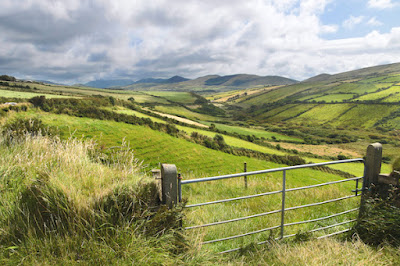
Dingle Peninsula, Ireland. Licensed from Depositphotos
Growing up outside of Boston in the 1970s and 1980s in a (mostly) Irish-American family, St. Patrick's Day was a big deal. As with other North American cities that had large Irish-American populations, people with roots in rural Ireland wanted to celebrate their heritage. St. Patrick's Day was the special day to do it.
The celebrations were well-intentioned, but could also be superficial or even out of control.
We kids would wear green clothing and greet each other with "Erin go Bragh" (Anglicization of the Gaelic Éire go Brách, “Ireland till the end of time”). We would also indulge in junk food with green food coloring, including green cookies, green cake, and the infamous Shamrock Shake.
The adults wore green, too. Some put on T-shirts and plastic hats that said "Kiss me, I'm Irish." There was a huge parade in South Boston, as well as Irish music performancesand banquets around town.
That said, the main attraction on March 17 seemed to be the partying on the sidelines of the parade, or heavy drinking in the bars, which could get wild. Very wild.
As Boston's demographics have changed, the parades are smaller and the wearing of green are not as common. But the revelry seems to be just as crazy.
In Ireland itself, St. Patrick's Day was once a subdued religious holiday, commemorating both Saint Patrick's death and the arrival of Christianity. In addition to attending Mass and wearing green, people would have a special meal even though it was Lent. In recent years, though, the celebrations have looked to America for inspiration, and taken on a more lurid, commercial tinge.
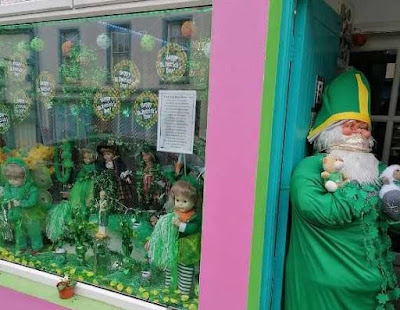
Shop window in Ireland on St. Patrick's Day
It's disappointing that a day honoring a saint and intended to recognize one's Irish heritage has become a big excuse to party. It seems hollow.
So, can I make a special request for St. Patrick's Day this year?
Instead of celebrating the superficial aspects of March 17, how about making an effort to recognize Ireland's history, culture, and spiritual life?
If you have Irish roots, take things a step further. Think about your ancestors' journey to a new land and a new life, and record their stories. Dig out those old photos, documents, and genealogy records, and make an effort to preserve them for the next generation.
One of the emails I received was from Peter Brown, an Australian who descended from one of the other 19th century Ardoch residents, Charles Calder, who ran a shop in the village. Peter noted that in the the mid 1950s a Reverend Mark Dilworth wrote about the famous Father Lachlan McIntosh, who lived in the village and tended to the hundreds of Catholic families residing in Glen Gairn and surrounding valleys north of the River Dee. The report was titled, "Catholic Glengairn in the early nineteenth century."
The Dilworth report included recollections collected by Mgr Meany (a missionary serving the Glen Gairn area) one stormy night (the interviewees may have been stranded in an inn during a storm) from several elderly ladies who had grown up in Ardoch 60 or 70 years before.
I had seen an abridged version of these accounts in Nita Caffrey's extensive 2006 genealogy, and wondered about the rest of the primary source. Peter speculated that it was located in Aberdeen University library, but he also had a PDF of the Ardoch pages, and from it had drawn up a map of the crofts at Ardoch circa 1830.
Peter and I decided to embark on a fun genealogy project: Publishing the 1830 map online (see below) and also building a census of the Ardoch occupants from the late 1700s to the mid 1800s based on data from Dilworth, official censuses, and other documents.
Ardoch was marked on a 1755 British topographical military survey; the arrows below point to "Ardoch" and "Ardoch Pinzey":
In 1785, according to the Dilworth paper, Father McIntosh built a chapel at Ardoch. The shape of the village was roughly like a horseshoe, as this 1868 UK Ordnance Survey map shows:
The earliest recorded inhabitants I could find were a Stuart and Lamont families (doubtful that the latter were related to me) who had infants born in Ardoch 1799 according to Catholic baptismal records. I took recreated census snapshots at 1814 and 1830. The official UK census for Scotland did not start until 1841, which is also included on the spreadsheet and people mapped to specific houses in the village.
First, here is an description of Father McIntosh and the village of Ardoch from Caffrey's 2006 genealogy:
The priest lived in a predominately Catholic hamlet, called Ardoch ( high field). This higher area was known to be of the ‘old faith’. It had about fourteen houses and it was a muddy place (and still is). “The houses were stragglin’ back and ‘fore as if they had fan’an oot o’ the air”, said one resident. There was steep land behind the houses. They had a school there but was “just a reeky hole”. A little burn (creek) came down between the houses and every house had a tiny dam, an outlet spout and a bucket underneath. It was a place for gossip and friendship.
“It’s a rough landscape with steep slopes and lots of stones and boulders. Few crops are seen except hay and potatoes, and few of the latter. The old tenant farmers were kicked off the land to make way for grouse and deer hunting, or for religious reasons. ... That said, the scenery is majestic and serene. Rugged peaks, burns, falls, deer everywhere and red grouse. The people are friendly and quite jolly, too. Pubs are crowded in town with locals and visitors. Two Highland weddings took place in town yesterday and they were dancing until 1 am next to our hotel.”
The map based on the Dilworth report was rough, but working with Peter and other sources I was able to create a digital version. The map notes a path leading northwest out of Ardoch to Clashinruich, the site of a simple chapel (Latlong coordinates: 57.097421, -3.134536). Citing James Dyas Davidson in this Flickr photo:
[The Clashinruich] chapel was built in 1785 by Father Lachlan McIntosh, a priest who tended the Catholic community in Glen Gairn for sixty four years. He died in 1846, aged ninety three. He was known as the apostle of Glen Gairn. ‘The altar was just a rough table. The roof was open and showed rude beams. Father Mann had the chapel lathed. Some of the folk had kneeling boards, but maist of them prayed kneeling on the clay floor.’ According to Ian Murray’s book, In the Shadow of Lochnagar, the field below the chapel was a burial ground, mainly for children who died in infancy. There is nothing today to indicate that it was a site of such tragedy.
Peter also proposed tracking residents of Ardoch to their respective countries of emigration, which as far as I know include Australia, New Zealand, South Africa, the United States, and possibly Canada. That's a project for another day, but if you have insights to share, please leave them in the comments or contact me.
I don't consider myself a genealogy pro. But over the past 11 years I've worked with a lot of traditional and new technology tools and have managed to build a fairly detailed family tree (700+ names to date, with the earliest going back to the 1700s) through interviews, examination of primary source materials such as photographs and vital records, and increasingly, using Internet-based resources as well as cheap software and digital devices. This post is intended to provide readers with a modern genealogy kit that can be used to build and/or expand their family trees in an organized fashion -- and share the results with relatives.
Overview
It's a tremendous amount of fun uncovering new names and facts about forebears. Another enjoyable aspect is being able to share new findings with kids, parents, siblings and cousins. Everyone in my family has been interested in the new names and connections that I've managed to dig up, and it's not surprising why: People in the United States are intensely curious about their origins. This has always been true, but in recent years the interest has spiked, thanks to media and technology trends. Consider the popularity of TV shows like History Detectives and the new PBS series "Faces of America," NBC's upcoming series "Who Do You Think You Are?" as well as the millions of users of Ancestry.com and other genealogy websites.
The following genealogy kit is a list of tools and techniques that I've found to be effective for amateur genealogical research. It's not a comprehensive list, but should be enough for people who are curious about their origins and want to understand how technology can help them get started.
One thing to keep in mind as you look at this list: Genealogy basically boils down to finding, organizing, and sharing information, tasks for which computers and digital technologies are extremely well suited. However, the best genealogical tools at your disposal are your human connections. I could learn more about my ancestors in a one-hour conversation with my aunt than I could with a one-year subscription to Ancestry.com. Living people are far more likely to know certain details that aren't stored in databases or vital records, and can often answer that critical question about the deceased: "What was he/she like"? Therefore, the starting point for any genealogical research should be living relatives (especially older ones) who can hopefully fill in basic names, family details, and places of origin going back a few generations, can identify people in old family photos, and can also paint pictures of their personalities.
In-person interviewing tools: Video cameras and digital audio recorders
In the mid-1980s, my mother did something that would later kick-start my first organized foray into genealogy. She recorded a series of interviews with her father (my grandfather) on a cheap audio cassette recorder. I found the cassettes in 1999, many years after he had died. They were a treasure trove of information, and illustrated how important face-to-face interviews could be. But they also illustrated a problem with the technology: Physical media quickly become obsolete. I saved the audio by converting them to mp3s, but what if I had discovered the tapes 10 years later? Would they have been playable? Would I still have a cassette player to play them back with?
Now, when I do interviews, I try to use a storage technology that can be directly stored on a hard drive, uploaded, or transferred via websites and email using a common, established software format. It's not a guarantee against obsolescence, but it's far more likely that the files can converted to other modern formats and/or converted back to physical media for the purpose of sharing or backups. With tapes or discs, they may deteriorate or not have a machine conveniently able to play them back in 10 years' time. But mp3, .wav, and mpeg video formats have been around for at least 10 years, and will almost certainly be compatible with playback software in the year 2020.
For video, Flip's cheap cameras come with a built-in USB jack for easy file transfer. You don't need any extra software -- the first time you slot it into your computer it will install software for viewing and transfering files. It also works with QuickTime media software on the Mac. Even better, they are extremely easy to set up. Unlike every camera made by a major Japanese manufacturer, the U.S.-designed Flip has a simple UI that requires no manual. The interface is dominated by a single button that a five-year-old can figure out (I'm not kidding). For a genealogy interview, it's a cinch to start the video rolling, place it on a nearby table pointing at the subject, and start talking. I am embedding a video below that I made a few years ago that shows how to use one.
For audio, the best devices are those that are easy to operate, create clear recordings, and use a standard software format that can be read by any computer. As a journalist, I have used several Olympus devices, which have reasonably good sound quality and create files in standard .wav format. However, they require special client software to operate, which is a big negative - installation is a pain, and the UI is mediocre.
I do NOT recommend using a BlackBerry for recording audio or video. The quality is terrible, and the video format is a proprietary one (mine creates .3GP files) that cannot be instantly read or converted by your computer. Further, installing BlackBerry media software on Windows computers is a buggy, frustrating mess.
Another alternative is using a PC or laptop-mounted video camera for interviews. The problem with this approach is the setup is a pain and it can be distracting or off-putting for the interview subjects, especially if the playback is displayed on screen. The last thing you want is for people to clam up or be distracted by technology when the interview is taking place. For the same reason, mounting a videocamera on a tripod or holding one up to your face as you do an interview will often result in an uncomfortable interview at first.
Phone/remote interviews: If you are unable to conduct an interview in person, the next best thing is to use the phone or an Internet service like Skype. If the subject is willing, try to record the conversation. Google Voice allows this with certain conditions (the subject has to call you, not the other way around), or you can use speakerphone with a digital voice recorder running. Be sure to ask the subject if it's OK to record the conversation before you start (it's not only a legal requirement, it's the right thing to do). If it's not possible take notes during the conversation and immediately after the call fill in additional details before you forget them.
Digital cameras: When I did a small genealogy tour last summer in New York state, one of the tools in my daypack was a digital camera with a 1 GB media card and a miniature extendable tripod. The camera was very useful for taking pictures of relatives, gravestones, and houses that were built by or inhabited by ancestors. On one occasion, it served as a makeshift scanner to take close-up pictures of documents that I couldn't take with me. A decent camera is a great way to preserve details for later examination, and I've also used the images in family genealogy books that I've distributed to relatives. Lastly, a camera is a good way to engage young people or other enthusiastic relatives who want to take part -- have them take the pictures of buildings, gravestones, and people while you take notes or conduct interviews.
I don't have any specific brand recommendations for cameras (you can browse Amazon's latest selection here). If you don't have one already, buy one that is good in low-light situations and has a high-quality setting (high-resolution pictures are important for copying photos, documents, and taking pictures of headstone inscriptions). For a lightweight collapsable tripod, I can recommend some of the Giotto tripods. The model I have weighs about two pounds, and is about the size of large, thick carrot. Collapsed, it can be used for document or photograph scanning (see inset image). Extended, it's about five feet tall.
Software
A good family tree program is crucial for any serious genealogical effort. Paper files and hand-drawn trees are useful, but they are limited by several factors, such as limited sharing and cross-referencing options. Mac or PC software can help organize the enourmous amount of family names and associated data that turn up over the years, and create extremely useful reports and charts.
I cannot recommend any PC program. For OS X, I use Reunion for Mac. It's an adequate program, but suffers from a overly complex and somewhat dated UI. The reports that it generates are useful but require a lot of tweaking. But the cost (about $100) is worth it -- I could not organize the data and be as productive as I have been in my research without it.
A third software option for family trees is online tools, such as Ancestry.com. I will address those in the next section.
Online tools
When it comes to the Web, there are a few types of applications used for genealogy. Research is the one most people are familiar with, but some people use websites to organize and store their families' genealogical data.
The reasons for organizing trees online are compelling. It's easier to share and connect trees with other researchers. There is no need to install software, because it's accessed through a standard Web browser. You can change computers at will, without transferring family data between machines. You don't have to worry about your hard drive going on the fritz, because it's stored on someone else's server.
But the downsides are significant. The number one concern is security. Spectacular failures of online services that store personal data have occurred in the past (see this story about the Microsoft/Sidekick fiasco). It's also not hard for someone to inadvertently wipe out their own trees with a few misplaced clicks. In either scenario, if the data isn't backed up, the result can be years of painstaking work flushed down the digital toilet.
An additional aspect of security for the online genealogical services is public access to private data. I support the idea of sharing select family tree data, but it should not be the default option, and online services should take a stricter approach to publishing names and connections relating to living people.
Another drawback to the online services is you don't know where they will be in a year's time. Business models, hosting charges, M&A activity or other factors may result in servers being taken offline or data being moved. Or, policies may change, as Ancestry.com's EULA makes clear:
Ancestry has the right, at its sole discretion, to modify this Agreement or the Service, including the Content of the Service, at any time.
In other words, prices may go up, certain features may be cut, or other changes may happen. When they do, users will either have to live with the consequences or go through the hassle of transferring or rebuilding the data somewhere else.
When it comes to research, genealogy websites can help you dig up some marvelous facts and insights. I have been able to locate records that I wouldn't have been able to find on my own, such as a document relating to my great-grandfather's WWI draft record. But Ancestry.com has lots of problems as described in my Ancestry.com review from two years ago. Other sites, such as some of the uploaded family trees found on Rootsweb or personal genealogy websites, are not adequately sourced -- it's not clear where the names or dates came from, which makes them difficult to verify or trust as being accurate.
In addition, a lot of people mistakenly think that research should start online and the only data worth finding is in Ancestry.com's database and elsewhere online. In actuality, the best genealogical research information is lying right under most people's noses, either in the form of living relatives who know about family origins and personalities, or photographs, letters, and other documents lying around in attics and old folders. Tackle these sources first, as well as easily accessible vital records and graves, before spending a lot of time online. The data you get will be richer and more reliable, and it will help you hone your online searches without wasting too much time.
My other blog posts about genealogy-related technology:
(See update at bottom) For the past three months, I've been using physical records (paper documents and audio files containing interviews with relatives), Reunion for Macand some free online genealogy services to build out my family tree. I did pretty well with what's available, and managed to create a tree with more than 200 names and lots of very specific information relating to dates and places of birth. However, I eventually reached a point where I could go no further.
So, this weekend I decided to give the subscription-based Ancestry.com a more thorough workout. I knew quite a bit about the service from my interview with its CEO earlier this year, and was particularly impressed by the amount of federal census data that the company and its partners have scanned and indexed. It includes all of the results from 1790 to 1930, which amounts to hundreds of millions of names. The site was offering a two-week trial for free, so I went for it.
The amount of information available through the service really is incredible. In the course of about six hours of online research, I was able to find census returns for two or three branches of my tree, obtained the names of about ten siblings of direct ancestors, and verified the states and countries of birth for many others. I even found the WWI draft card for my paternal great-grandfather, a person who had previously been just a name with some rough biographical information. The digital image of the card on ancestry.com included his exact date of birth and his occupation in 1918 -- a rail road freight handler.
But Ancestry.com has limitations, too, some relating to the tool itself, and others relating to nature of the records.
I'll start with the search interface. It is not for the faint of heart; a search for a single name can generate hundreds or even thousands of results. The options for refining them do not include an easy way to exclude certain types of records, such as federal censuses from after a certain date. Fortunately, the interface includes a useful "save to shoebox" function which allows users to quickly save a record to a front-page location for more thorough investigation later, which is useful for plowing through multiple pages of search results without getting hung up on transcribing or saving image files. You can also search individual data sets, such as the census from a certain year through the "card catalog" section of the website.
One other interface issue involves uploading GEDCOM files (family tree data files that use the LDS Church's industry standard data interchange format). You have to start a tree before you can upload a GEDCOM, which is frustrating, but I was a little disturbed by the way ancestry.com treats the file. Once you upload a GEDCOM file, the information on it is made public by default. This was not made clear during the upload process unless you click off to the EULA; I only found out after I checked through the "Manage my tree" link.
In addition, there's no easy way of telling what sorts of notes are included in the uploaded GEDCOM data that's made public -- is it just name, date of birth, place of birth, and family connections? Or does it include all of the personal notes that I added in Reunion for Mac, including sensitive pieces of data such as cause of death?
I made my tree "private," but I am thinking of pulling it down. This is not just because of privacy concerns but also because I would rather maintain the "master" tree with attached photos and audio files on my home computer.
The records themselves have some flaws as well. For two branches of my family, I have encountered instances of surnames being incorrectly transcribed and indexed. It's east to spot, if you look, because the indexed text doesn't match up with the scanned image of the original government document. However, it's a significant problem in that it has a major impact on how search results are presented, and also how users rank them in terms of usefulness -- if I'm looking for "Walsh," I am more likely to skip over the results that are listed as "Welsh" or "Walch" because I can't be bothered to check the original. Ancestry.com is sensitive to this; there is a link next to all records in the database which allow users to notify the company of typos and other mistakes.
Still, I found the error rate is high. Part of this relates to the fact that Ancestry.com outsources its data-entry tasks to Chinese companies, but I believe another issue is American handwriting standards -- I have observed that the quality of the cursive used by census enumerators and clerks seemed to decline after 1900. Add to the mix damaged paper records (such as water stains in the attached image, below) and darkened and blurred scans, and it's no wonder that the transcriptions have a high error rate.
The original records sometimes have other errors. I've noticed that the census records often contradict the information that I've obtained via interviews and other documents. Sometimes, census returns even contradict each other. One example I saw tonight involved the 1870 and 1880 federal census returns for my maternal great-grandmother. In the earlier version, all of her siblings are listed as being born in Rhode Island. In the 1880 scan, the older children are listed as being born in New Jersey.
There are many reasons why this could have happened -- a simple miscommunication, a deliberate attempt to mislead the enumerator, a lazy or harried enumerator, or something else. I'll never find out why one of them was wrong, but it forces me to find another record to determine which one is right. It also raises the specter of many errors never even being detected, because there is no second source to check them against.
And this brings me to my final point: Ancestry.com and other online sources bring a lot of new information to the genealogical treasure hunt, but there are many holes in the online records. Using ancestry.com's supposedly complete database of federal census returns from 1790 to 1930, I have been unable to find any records of certain people who I know existed. Others show up for a specific census, but cannot be found in any other census or online document. An example is my great grandfather, the rail road freight handler -- I found his military record, and he showed up for the 1920 census along with his family, but there is no record of him in the 1910 or 1930 censuses, even though I know he was alive and living in the same state. I have a possible hit on the 1900 census, but it's also possible it was someone else with the same name and roughly the same age living in the same area. Most of the federal 1890 census was destroyed in a fire, and the online data for the 1880 census doesn't have any results either. So, while Ancestry.com was the source for his date of birth and occupation, I still don't know the names of his father or mother -- only that they were born in the same state (a fact which I gleaned from the 1920 census results).
This points to a very basic fact about genealogical research in the 21st century -- despite the availability of wonderful online research tools and mechanisms to share findings with others, some of the most useful primary sources and sources of data remain in paper format ... or in people's heads. This is the way it's been for centuries, since people started doing genealogical research. I've done a lot of work in terms of interviewing relatives and gathering documents from family members, and I've gotten a lot of new information from the World Wide Web, but it's still not enough. One of these days I am going to have to make a trip out to my great-grandfather's hometown and spend a few hours in the county clerk's office, tracking down the all-important vital records that can really fill in the blanks on that branch of my family tree. It may seem like an old-fashioned way of conducting research, but it will probably bring some of the most rewarding results.
(Update: See my Ancestry.com review) Earlier this week I posted a series of blog posts related to my own genealogical research, as well as a "what if" scenario involving Google and public records. The question I considered: What would it mean if Google or some other company digitized and indexed millions of public records, ranging from census forms to police reports, and made them free to search and view?
I got an answer from Google about this, and also had a nice talk with the CEO of The Generations Network, which owns Ancestry.com. Google declined to discuss its plans, but the Ancestry.com CEO brought up a very interesting point: Unlike printed text, which can be scanned and converted to digital text using OCR software, handwriting is very difficult to read by computer. It's part of the reason why captchas (curvy block letters that are used to authenticate online submission forms) are used to frustrate spam bots. Computers can't read them. And if computers can't read captchas, you can imagine how tough it would be for computers to decipher spidery cursive from the mid-19th century from hundreds of thousands of different hands.
So how did Ancestry.com build its database of all census forms from 1790 through 1930? They used humans to read the forms and enter the data. These weren't Ancestry's employees, but rather the staff of companies in China who could (I assume) do it for less than American labor. Naturally, that leads to the question of whether the results are accurate enough, but the CEO said the transcriptions were handled by staff who were trained to read these old writing styles. The following example from an 1860 census form is from Ancestry.com:
It's worth noting that most Chinese are far more sensitive to variations in writing styles thanks to the Chinese character system and the calligraphy tradition which is still widespread there. Chinese have to be able to discern slight variations in strokes and also writing styles, which can vary greatly from person to person.
(Update: Since writing this post, I have launched a company which is dedicated to helping people understand complicated technologies and concepts. Besides creating online posts which address questions such as What Is Dropbox and What Is Google Drive, I have also published a series of guides under the In 30 Minutes brand.)
As I continue on my family research project using Reunion for Mac and the Web, a cold reality has set in: There is relatively little data online, especially from important vital records and census returns. This page from the Niagara County, NY GenWeb Project sums up the roadblock I have encountered:
"Few freely available census transcriptions are online for Niagara County."
I have been able to find some family data from the 1880 Federal Census for one branch from my father's side (via the LDS FamilySearch.org website), but other branches don't have any online records from the same source, meaning they haven't been uploaded, or, for whatever reason, the family members weren't counted.
Another reality about online genealogy research is that many records from individual families or from cemetery transcriptions exist on personal websites. These can be useful but there is always the danger that they will disappear when the hosting company shuts down a page that hasn't been updated in years, or the owner decides to pull the plug. For that reason, I am saving any such pages that look remotely connected to my research, so at least I'll have them on my hard drive for future reference.
I've been using a Mac program called "Reunion" to build a family tree over the past three weeks. The trial version was included in Genealogy for Dummies, but I decided to buy the full version after about a week -- it's a pretty good tool for the tedious task of data entry, and allows users to drag photos and other multimedia from iPhoto, export to text and GEDCOM (the standard data exchange format for genealogy projects) and make a bunch of different reports.
The tool is also good for focusing efforts. Anyone getting started with a genealogy project will be overwhelmed by the immense stores of information in both book and electronic form. Our local library has a special history reading room that has hundreds of record books and indexes, but there is no structured way for the novice to approach them. The Internet is the same -- there are dozens of larger genealogy sites, and thousands of online family trees, municipal databases, and cemetery lists. And there's Google -- it's so tempting to enter a name and a known fact about an ancestor, and see what turns up. But the results seldom provide clear, convenient answers. Rather, Google searches are usually starting points for further clicking, and the trails often lead nowhere. It can be a giant time suck, and very counterproductive.
Reunion has really helped me get this project off the ground. It allowed me to sit down with the many records I already have in my possession -- photos, audio recordings, handwritten letters and family trees -- and gradually collect all of the relevant biographical information into a single digital record that I can refer to later and use as the basis for focused explorations at the library or online. Listening to audio recordings of my great aunt, I was able to enter scores of family members from her generation and older with reasonably precise birth dates, occupations, addresses, and other information that may come in useful when I eventually hit the stacks. Reunion also has a very neat sourcing function, that I use to record the origins of practically every piece of information. It's been great for tracking down and verifying names and other pieces of data that may not have been clearly identified on the backs of photos or in some handwritten family trees in my possession, and you can reuse sources which saves typing and data-entry hassles.
Another interesting thing about the software is the export format. Before I cracked open Genealogy for Dummies, I knew that there had to be a standard data exchange format that worked with various software packages and websites. I was expecting an XML-based format, and while several exist the gold standard for genealogy data exchange turns out to be a format developed for and maintained by the LDS church called GEDCOM. A single GEDCOM record might look like this:
0 @I18@ INDI
1 NAME John /Heary/
2 SOUR @S5@
1 SEX M
1 BIRT
2 DATE 1890
2 SOUR @S5@
1 DEAT
2 DATE 1975
2 SOUR @S5@
1 OCCU Steel mill worker during WWI
2 SOUR @S13@
1 HEAL @N26@
1 _UID 619468F811904C9CB93B2A1DFD7B44A176F4
1 FAMC @F10@
1 CHAN
2 DATE 9 SEP 2008
If GEDCOM looks old school, that's because it is -- the format was originally created in the 1980s and the last major revision was apparently in 1996. XML seems to be the next logical step, but for whatever reason adoption has been slow. Reunion for the Mac doesn't even export in XML, even though at least one major schema exists, according to Genealogy for Dummies.




 , which have reasonably good sound quality and create files in standard .wav format. However, they require special client software to operate, which is a big negative - installation is a pain, and the UI is mediocre.

 and some free online genealogy services to build out my family tree. I did pretty well with what's available, and managed to create a tree with more than 200 names and lots of very specific information relating to dates and places of birth. However, I eventually reached a point where I could go no further.

